
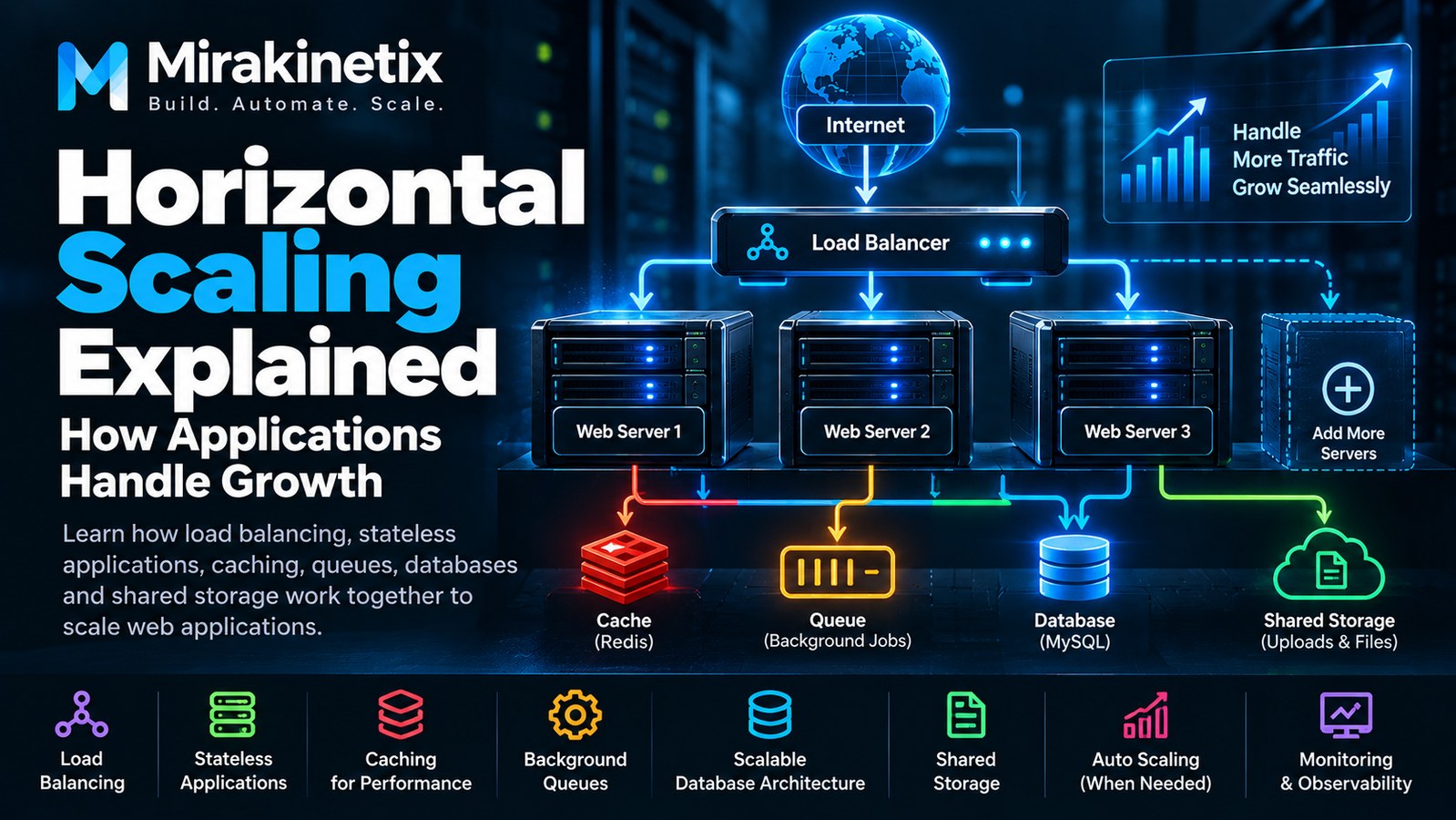
An application that works perfectly with a few hundred users can behave very differently when traffic grows.
The first instinct is often to buy a larger server with more CPU, RAM, and faster storage. This is vertical scaling.
Eventually, however, a single server can become a bottleneck. At that point, horizontal scaling becomes an option: instead of continuously increasing the capacity of one machine, you add multiple application servers and distribute traffic between them.
The important part is that horizontal scaling is an architectural change, not simply a matter of adding more machines.
Vertical vs Horizontal Scaling
Vertical scaling increases the capacity of an existing server:
4 CPU / 16 GB RAM
        ↓
8 CPU / 32 GB RAM
        ↓
16 CPU / 64 GB RAM
Horizontal scaling adds additional servers:
                 Load Balancer
                       │
          ┌────────────┼────────────┐
          ↓            ↓            ↓
       Server 1     Server 2     Server 3
          │            │            │
          └────────────┼────────────┘
                       ↓
                    Database
Vertical scaling is often simpler and works well for smaller applications.
Horizontal scaling becomes useful when a single server is no longer sufficient for the application's traffic, availability, or workload requirements.
Start With the Real Bottleneck
Before adding servers, measure the application.
Look at:
CPU utilization
Memory usage
Request latency
Error rates
Database performance
Slow queries
Cache hit rates
Queue depth
External API latency
Network utilization
For example, adding three application servers will not solve a poorly indexed database.
Similarly, adding RAM will not fix an N+1 query problem.
The first step should always be:
Measure the bottleneck before changing the architecture.
Use a Load Balancer
Once multiple application servers exist, incoming traffic needs to be distributed between them.
A load balancer can route requests across healthy servers.
Common strategies include:
Round robin
Least connections
Weighted distribution
Health-based routing
A load balancer should also perform health checks so that traffic is not sent to an unhealthy server.
For example:
GET /health
can provide a lightweight application health endpoint.
The endpoint should verify enough of the application to establish meaningful availability without performing unnecessarily expensive operations.
Keep Application Servers Stateless
This is one of the most important requirements for horizontal scaling.
If an application server stores important user state locally, requests can become dependent on which server receives them.
For example:
Request 1 → Server 1
Request 2 → Server 2
If the state created by Request 1 exists only on Server 1, Server 2 may not have access to it.
Instead, shared state should live in appropriate external systems:
Application Servers
        │
        ├── Redis
        ├── Database
        ├── Object Storage
        └── Queue
This allows application servers to remain interchangeable.
Sessions Need Special Attention
Sessions are a common source of problems when moving from one server to multiple servers.
If sessions are stored only on local disk:
User → Server 1 → Local Session
the next request may reach Server 2:
User → Server 2 → Session unavailable
Use a shared session backend where appropriate.
Laravel applications can use shared session storage such as Redis or a database.
The goal is simple:
A user's session should not depend unnecessarily on one application server.
Handle Uploaded Files Properly
Uploaded files create a similar problem.
Suppose a user uploads:
profile.jpg
to Server 1.
If the file exists only on Server 1, Server 2 cannot necessarily access it.
For horizontally scaled applications, user uploads and other shared files should generally use shared or object storage.
Application
     ↓
Object Storage
     ↓
Images / Documents / Uploads
This keeps application servers from becoming the permanent source of truth for shared files.
Caching Can Reduce Pressure
Caching can reduce repeated database and application work.
A typical architecture might look like:
User
 ↓
Load Balancer
 ↓
Application
 ↓
Cache
 ↓
Database
Redis is commonly used for:
Application caching
Sessions
Rate limiting
Queues
Temporary data
Caching should be introduced based on measured application behavior.
The main challenge is invalidation.
A stale cache can return incorrect information, so developers need a clear strategy for when cached data should expire or be replaced.
Databases Often Become the Next Bottleneck
Adding application servers does not automatically increase database capacity.
Consider:
Server 1 ──┐
Server 2 ──┼──→ MySQL
Server 3 ──┘
Server 4 ──┘
All of those servers may still depend on the same database.
Before introducing complicated database architectures, optimize the database you already have.
Review:
Slow queries
Indexes
Query plans
N+1 queries
Connection counts
Transactions
Schema design
Caching
Read/write patterns
Good database optimization can often postpone the need for more complex scaling strategies.
Read Replicas
When database read traffic becomes significant, read replicas can distribute appropriate read workloads.
A simplified architecture is:
             Application
              /       \
             ↓         ↓
        Primary DB   Read Replica
          Writes        Reads
The application needs to understand that replicated data may not be immediately consistent.
Operations that require strong consistency may need to read from the primary database.
Read replicas should therefore be introduced based on actual workload requirements rather than simply because the application has multiple servers.
Use Queues for Background Work
Not every operation needs to happen during an HTTP request.
Examples include:
Sending email
Generating reports
Processing images
Importing large datasets
Calling slow external APIs
Generating documents
Instead of keeping the user waiting:
HTTP Request
     ↓
Long Operation
     ↓
Response
use a queue:
HTTP Request
     ↓
Queue Job
     ↓
Fast Response

Worker
     ↓
Process Job
Workers can then be scaled independently:
Queue
 │
 ├── Worker 1
 ├── Worker 2
 ├── Worker 3
 └── Worker 4
This is particularly useful when background workloads grow independently from web traffic.
Avoid Unnecessary Sticky Sessions
Some load balancers support sticky sessions, where a user is repeatedly routed to the same application server.
This can make some legacy architectures easier to operate, but it also creates a dependency on that particular server.
If the server fails, the user may experience disruption.
A stateless application with shared session storage generally provides more flexibility because any healthy server can handle the request.
Configuration Must Be Consistent
Every application server should run the same application version and receive the appropriate environment-specific configuration.
For example:
Git
 ↓
Build
 ↓
Test
 ↓
Deploy
 ├── Server 1
 ├── Server 2
 └── Server 3
Configuration should not be manually changed on individual servers.
Use controlled deployment and configuration processes so that servers do not gradually drift apart.
This also makes rollback easier.
Logging Becomes More Important
With one server, checking a local log file may be sufficient.
With multiple servers, application events can be distributed across several machines.
Server 1 → logs
Server 2 → logs
Server 3 → logs
Server 4 → logs
Centralized logging makes it easier to investigate problems across the entire application.
Monitor useful signals such as:
Request rates
Response times
Error rates
CPU
Memory
Database latency
Cache performance
Queue depth
Worker failures
Scaling without observability makes it difficult to determine whether the architecture is actually improving performance.
Health Checks and Graceful Failure
A scalable system needs to handle individual server failures.
If Server 2 becomes unhealthy:
Server 1 ── Healthy
Server 2 ── Failed
Server 3 ── Healthy
the load balancer should stop sending new traffic to Server 2.
The application should also shut down gracefully where possible, allowing existing work to finish rather than abruptly terminating requests.
This becomes particularly important during deployments and autoscaling events.
Autoscaling
Once an application is designed to add and remove servers safely, infrastructure can potentially automate that process.
A simplified flow is:
Traffic increases
      ↓
Capacity threshold reached
      ↓
New server starts
      ↓
Health check passes
      ↓
Load balancer adds server
When demand decreases, unused capacity can be removed.
Autoscaling can reduce manual intervention, but it does not fix an application that is not designed for multiple instances.
The architecture must first support interchangeable application servers.
Horizontal Scaling With Laravel
Laravel applications can be designed for horizontal scaling.
Important areas include:
Shared sessions
Shared cache
Centralized queues
Shared or object storage
Database architecture
Stateless application servers
Consistent configuration
Centralized logging
Health checks
A simplified Laravel architecture could look like:
                    Load Balancer
                         │
          ┌──────────────┼──────────────┐
          ↓              ↓              ↓
       Laravel        Laravel        Laravel
       Server 1       Server 2       Server 3
          │              │              │
          └───────┬──────┴──────┬───────┘
                  ↓             ↓
                Redis         MySQL
                  │
                Queue
The actual architecture should be proportional to the application's requirements.
A Practical Scaling Roadmap
A sensible progression is:
Stage 1 — Optimize the Existing Server
Start with:
Application profiling
Query optimization
Database indexes
Caching
PHP configuration
Web-server tuning
Monitoring
Stage 2 — Separate Expensive Work
Move suitable workloads into:
Queue workers
Redis
Object storage
Dedicated infrastructure where justified
Stage 3 — Introduce Multiple Application Servers
Add:
Load balancing
Shared sessions
Shared cache
Shared storage where required
Centralized logging
Stage 4 — Scale Based on Measurements
Add application servers as traffic and workload require.
Load Balancer
      ↓
App 1
App 2
App 3
App 4
Stage 5 — Address Data-Layer Constraints
If the database becomes the bottleneck, investigate appropriate solutions such as:
Further query optimization
Index improvements
Read replicas
Partitioning
Sharding
Specialized storage
The solution should match the actual workload.
Don't Scale Too Early
Horizontal scaling is not automatically better.
If an application has:
Low traffic
Simple architecture
A reliable server
Plenty of available resources
then adding multiple servers may introduce more complexity than value.
You may suddenly need:
Load-balancer management
Distributed logging
Shared storage
Redis
Queue infrastructure
More monitoring
More deployment automation
More failure scenarios
Build the simplest architecture that satisfies the current requirements.
Then evolve it when measurements show that the existing architecture is no longer sufficient.
Final Thoughts
Horizontal scaling is an architectural approach for distributing application workloads across multiple servers.
The difficult part is not creating another server. It is designing the application so that servers can safely operate as interchangeable instances.
That means managing sessions and files outside individual servers, using appropriate caching and queues, protecting the database from unnecessary load, keeping deployments consistent, and maintaining good observability.
The practical principles are:
Measure before scaling.
Keep application servers stateless.
Externalize shared state.
Scale the actual bottleneck.
Automate deployments.
Monitor the entire system.
Most importantly, do not build a distributed system simply because you expect future growth.
Build the simplest architecture that works today, measure its limits, and introduce complexity only when the requirements justify it.


